AWS SNS and SQS Support
AWS SNS (Simple Notification Service) acts as a broadcast hub for notifications that can be delivered over multiple channels such as texting (SMS), email, or programmatic queues. AWS SQS (Simple Queue Service) is one such programmatic queue, which can act as a recipient for SNS messages or be used as a standalone message queuing service. Novelty can interact with SNS and SQS by publishing observation results to an SNS topic, or by reading messages (records) from an SQS queue.
Using SQS to Read Records From SNS
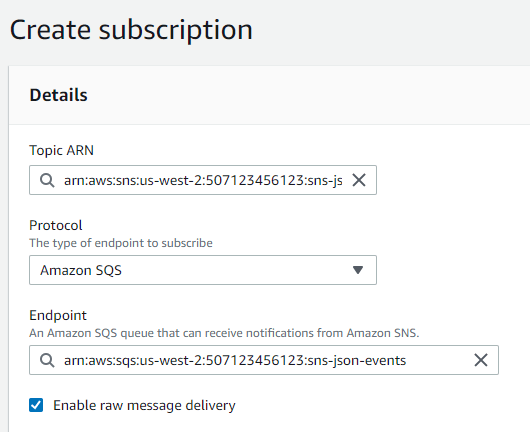
Both SNS and SQS can be used in conjunction with Novelty to ingest messages published to an SNS topic. In order to do so, simply register a new SQS queue as a subscriber to the SNS topic via the SNS console, being sure to check the "enable raw message delivery" box. Then, ingest from SQS as described in the SQS section of this page.
Reading Records from SQS
Novelty has full support for reading records from SQS Queues. The means by which Novelty interprets a record is highly configurable via the REST API.
SQS Ingest Example
In this example, we will register an SQS queue as a data source, scoring each object as an observation, and acknowledging receipt of each record from SQS to dequeue it.
Preparation for SQS Ingest
For the purposes of this tutorial, you will need an SQS queue and credentials (an access key ID and secret access key) for an IAM User with the following privileges for that queue:
- sqs:ReceiveMessage
- sqs:DeleteMessage
- sqs:DeleteMessageBatch
- sqs:ChangeMessageVisibility
- sqs:ChangeMessageVisibilityBatch
- sqs:GetQueueAttributes
For our example, we'll assume there is such a user with access to the json-events stream with access key ID AKIAMYACCESSKEY and secret AWSScRtACCessKeyAWS/ScRtACCessKey. These will be used to register the data source with Novelty. We'll assume the queue has the URL https://sqs.us-west-2.amazonaws.com/507123456123/json-events and contains JSON-encoded data.
Registering SQS as a data source
To register SQS as a data source to Novelty, we need to describe our queue via the ingest REST API.
For example, we'll use the previously-described json-events queue, and we'll give the Novelty ingest stream the name main-queue. Thus, we make our API request using Create Novelty Stream: POST /api/v2/model/{modelName}/ingests with the following payload:
{
  "name": "main-queue",
  "source": {
    "type": "SQS",
    "queueUrl": "https://sqs.us-west-2.amazonaws.com/507123456123/json-events",
    "credentials": {
      "accessKeyId": "AKIAMYACCESSKEY",
      "secretAccessKey": "AWSScRtACCessKeyAWS/ScRtACCessKey"
    },
    "region": "us-west-2",
    "deleteReadMessages": true,
    "format": {
      "type": "Json"
    }
  },
  "transformation": "my-transformation"
}
Credential Redaction in API Responses
For security, accessKeyId and secretAccessKey values are automatically redacted in API responses. These fields display as Secret(****) instead of their actual values. This does not affect how credentials are stored or used internally—only API responses and logs are redacted. When configuring credentials via POST or PUT requests, provide the actual plaintext values.
Because the SQS queue is filled with JSON records, each record is decoded as JSON and passed to the transformation my-transformation, which turns it into one or more observations. Novelty records and scores each observation in the model named in the request path. The model and the transformation must exist before you create the stream; create them with Create Model: POST /api/v2/system/models and Create Transformation Function: POST /api/v2/model/{modelName}/transformations. Without a transformation, each record must already be a JSON array of strings.
We also choose to acknowledge receipt of each message successfully read off the queue, and thus set "deleteReadMessages" to true (this is the default!) If we wanted to read messages off the SQS queue, but leave them in the queue for SQS to re-issue to other consumers later, we would set deleteReadMessages to false.
Writing Results to SNS
Novelty also supports writing observation results to AWS SNS.
SNS Write Example
In this example, we will register an SNS topic as a target for scored observations, issuing a single message for each result.
Preparation for SNS Output
You will need an SNS topic and credentials (an access key ID and secret access key) for an IAM User with the sns:Publish privilege for that topic. For this example, we'll assume the same user (with access key AKIAMYACCESSKEY) has sufficient privileges for a topic sns-json
Registering SNS as an Observation Output
To register SNS as an observation output, we need to describe our output via the REST API.
We'll use the topic sns-json with ARN arn:aws:sns:us-west-2:507123456123:sns-json. Outputs are part of the stream definition and are set when you create the stream, so add an SNS destination to the outputWorkflow of the Create Novelty Stream: POST /api/v2/model/{modelName}/ingests request body, next to source and transformation. Adding this to the SQS example above publishes each scored observation to the topic:
{
  "outputWorkflow": {
    "destinations": [
      {
        "type": "SNS",
        "topic": "arn:aws:sns:us-west-2:507123456123:sns-json",
        "credentials": {
          "accessKeyId": "AKIAMYACCESSKEY",
          "secretAccessKey": "AWSScRtACCessKeyAWS/ScRtACCessKey"
        },
        "region": "us-west-2",
        "format": {
          "type": "JSON"
        }
      }
    ]
  }
}